- Platforms
- Mac
- Requires
- macOS 11+ (Apple silicon) · 10.11+ (Intel) · USB PC/SC NFC reader
- Status
- Mac available
- Developer
- John Dawson
What it does
Lots of point-of-sale and time-clock apps only let staff sign in with a numeric PIN. NFC Card Reader turns an inexpensive NFC tag, card or key fob into that PIN. Tap the badge on a USB reader and the Mac types the code into whatever has focus, just as if someone had keyed it in.
It was built so retail staff could fob into the Odoo Point of Sale register instead of typing a code at every shift change. Because it works like a keyboard, it also works with time clocks, kiosks and any other app that asks for a number. No plug-ins and no changes to the app itself are needed.
What's inside
Fob into PIN-only apps
Badge-tap sign-in for Odoo Point of Sale, time clocks and kiosks that only accept a numeric PIN.
Tap to type
The badge's number is typed into the focused field of any app as ordinary keystrokes, so nothing needs integrating.
Nothing to program
Uses the hardware ID every NFC tag already has. Nothing to write to the card, and 4-, 7- and 10-byte IDs are converted exactly.
No drivers
Works through macOS's built-in smart-card support with standard USB readers such as the ACS ACR1252U.
Match existing badges
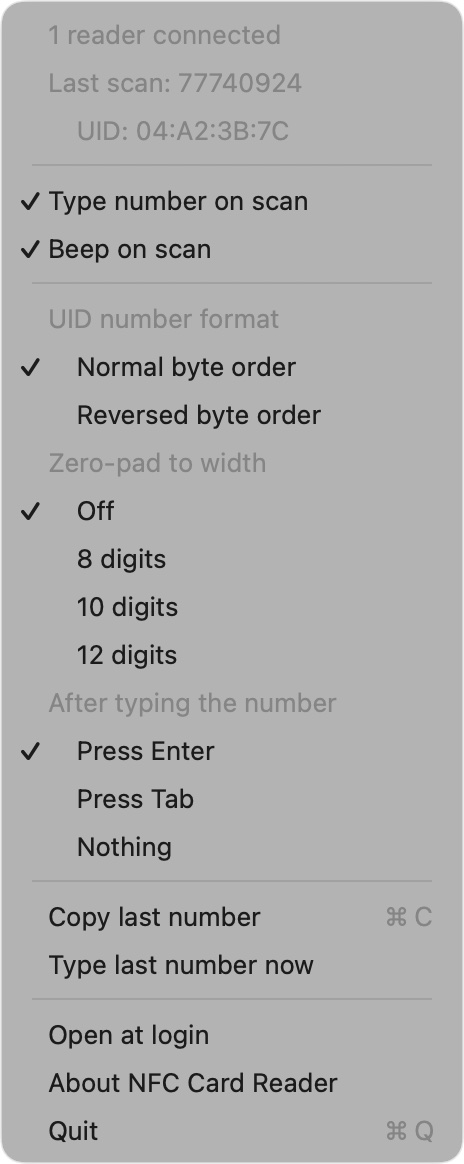
Normal or reversed byte order, so the number can match what's printed on access cards and Wiegand systems.
Consistent PINs
Optional zero-padding to 8, 10 or 12 digits so every badge number is the same length.
Submit automatically
Press Enter or Tab after the number, or nothing, to log straight in or jump to the next field.
Lives in the menu bar
Shows reader status, the last scan, an optional confirmation sound, a test-type button, an on/off switch and open at login.
A closer look
Tap any screenshot to enlarge. Swipe or scroll sideways for more.
Get it now
Pick your platform below.
Download for Mac: v1.1 · notarized · 4.3 MB DMG · needs Accessibility permission to type